Skip to main content
  Add Elite Elevators as preferred


Table of Contents
- What Actually Changes About Using Controls From Elevator For Elderly?
- What Is The Case For Physical Push-Buttons In An Elevator For Elderly Users?
- What Is The Case For Touch Controls In Senior-Friendly Elevators?
- What Are The Control and Accessibility Specifications Across the Elite Elevators?
- What Are The Other Factors That Make Elite Elevators Senior-Friendly?
- Frequently Asked Questions
Senior-friendly elevators should prioritise easy access, simple operation and appropriate safety features to make everyday floor-to-floor movement more convenient for older adults. Elite Elevators offers residential elevator solutions designed with features that can support comfortable and accessible use.
As mobility needs change with age, even small details can influence how comfortably someone moves around the home. A lift control panel that feels intuitive to one person may be less convenient for an older family member, particularly when buttons are difficult to identify or touchscreens require precise interaction. For families planning a home lift, choosing the right control system can therefore be an important part of creating an accessible everyday experience.
Traditional push-button controls provide a physical point of contact, making it easier for some users to locate and operate a floor selection without looking closely at a screen. Touch controls, meanwhile, can offer a clean interface and additional functions, but their usability depends on screen design, responsiveness and the user’s familiarity with digital interfaces.
When comparing senior-friendly elevators, homeowners should consider factors such as button size, visibility, tactile feedback, control placement and ease of operation. For anyone selecting an elevator for elderly family members, this guide explores the practical differences between push-button and touch controls to help determine which option better suits their accessibility needs.
What Actually Changes About Using Controls From Elevator For Elderly?
Understanding the mechanism matters more than opinions about which looks modern.
Fingertip capacity decline: Capacitive touch panels register a change in electrical field from skin contact. Drier, thinner skin on older fingertips produces a weaker signal, and some panels simply do not register it reliably. This is the single most common cause of the “I pressed it and nothing happened” experience.
Proprioception weakens: Younger users judge whether they’ve pressed something through subtle feedback in the joint and fingertip. That sense diminishes, making tactile confirmation — a physical click, a button that moves — disproportionately valuable.
Contrast sensitivity: A person may read a newspaper comfortably yet struggle with a low-contrast icon on a glossy panel. Reflective surfaces in a bright hallway compound this considerably.
Extended Response time: Older users typically need longer between arriving at the panel and completing a selection — which makes door timing as important as the buttons themselves.
What Is The Case For Physical Push-Buttons In An Elevator For Elderly Users?
Tactile controls remain the more forgiving choice for the majority of older users, for reasons that are practical rather than nostalgic.
The Elite Elevators E Series uses push-to-run buttons, providing physical feedback independent of eyesight. The user knows the press registered without needing to look at a display or interpret a colour change.
They work regardless of skin condition, gloves or damp hands.
They can be located by touch alone. A user with poor vision learns the panel’s geometry within days and can operate it without reading anything.
A physical button is in the same place every time. A touch interface may present different options in different contexts, which increases cognitive load for a user with mild memory impairment.
What Is The Case For Touch Controls In Senior-Friendly Elevators?
Touch panels are not automatically the wrong answer, and in some households they’re clearly the better one.
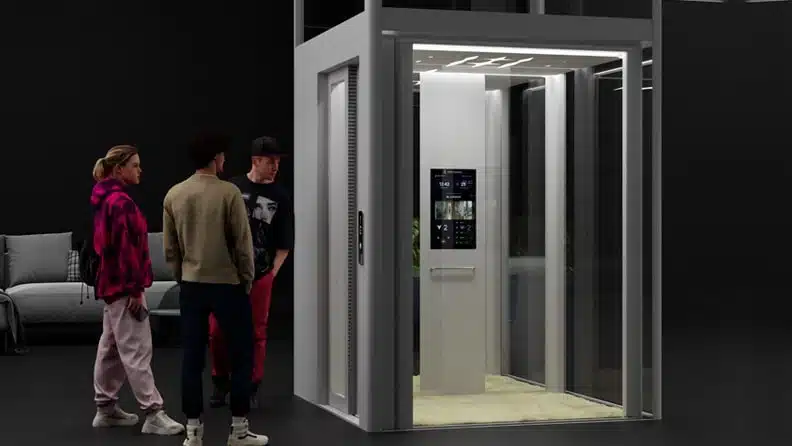
Larger targets: A smart touch panel with advanced interface on the X200 Plus can present targets far larger than a physical button, with backlighting that solves the contrast problem rather than worsening it.
Floor selection: The X400 Mark Ⅱ’s smart cabin display lets a user make calls and adjust cabin lighting or fan speed from the screen — genuinely useful for a senior travelling alone who needs to reach someone.
Voice Vs interface: The X400 Mark Ⅱ’s Elite Elevators AI responds to speech and learns routines, anticipating the next destination. For a user with significant tremor or arthritis, speaking is easier than pressing anything.
Biometric access: On the X400 Mark Ⅱ, a fingerprint unlocks the lift and grants access to restricted floors without requiring any manual selection — arguably the most senior-friendly interface of all, because there is nothing to operate.
What Are The Control and Accessibility Specifications Across the Elite Elevators?
| Accessibility Need | Specification | Available On |
| Confirming a press without looking | Automatic one-touch platform control with call reservation | E200, E300 |
| Operating with significant tremor | Elite Elevators AI — voice operation, learns routines | X400 Mark Ⅱ |
| Reading the panel with reduced contrast sensitivity | TFT colour display with landing indicator; COP in Black standard, Mirror or Gold optional | E200, E300 |
| Larger targets for unsteady hands | Compact touch panel (X200); 21″ Live Board (X200 Plus, X400 Mark Ⅱ) | X200, X200 Plus, X400 Mark Ⅱ |
| Calling for help from inside | Autodialer standard, GSM optional (E200); alarm and two-way intercom (E300); GSM with power backup (X200); Live SOS 2.0 (X400 Mark Ⅱ) | Full range |
| Verified safety compliance | Machinery Directive 2006/42/EC, EN 81-41; EN 81-20 and EN 81-50 (X400 Mark Ⅱ) | Full range |
What Are The Other Factors That Make Elite Elevators Senior-Friendly?
Some exceptional factors make Elite Elevators a senior friendly option. They are as follows:
Ride quality: The E Series includes a patented gentle soft start and stop device, and the E300’s gearless CogBelt delivers effortless acceleration and deceleration. Abrupt movement is a balance risk for frail users.
Entry and exit: Auto re-levelling and door width both matter. Door openings across the hydraulic range run 600–900 mm, and a wider opening is easier with a frame or stick.
Power-cut behaviour: Nothing frightens an older passenger more than stopping unexpectedly. The E Series includes battery-operated emergency lowering taking the cabin to a floor for safe exit, with cabin light and fan backup; the X series adds an Automatic Rescue Device with GSM emergency calling.
Certified safety: The E200 and E300 comply with the European Machinery Directive 2006/42/EC, are certified to EN 81-41, and carry a certified safety system kept separate from the overspeed governor. The X400 Mark Ⅱ meets EN 81-20 and EN 81-50.
The E50 stairlift is built for those with reduced mobility. Advanced Levelling technology rotates the seat to a safe exit position automatically. It carries 125 kg, fits staircases as narrow as 610 mm at inclines up to 72°, runs on 2 × 12 V batteries, and is certified to EN 81-40.
Frequently Asked Questions
-
Are push-button or touch controls better for elderly users?
For most older users, physical push-buttons are more reliable because they provide tactile confirmation and work regardless of skin dryness. The Elite Elevators E200 and E300 use push-to-run buttons with automatic one-touch platform control and call reservation. Touch panels on the X200 Plus and X400 Mark Ⅱ suit users who benefit from larger, backlit targets, or who prefer voice and biometric operation.
-
What features make an elevator senior-friendly?
Look for tactile or voice-operable controls, a handrail, precision auto re-levelling so the cabin aligns exactly with the floor, soft start and stop, adequate door width (600–900 mm on the Elite Elevators hydraulic range), battery-operated emergency lowering, and two-way emergency communication. An optional fold-down seat, available on E200, helps users with limited standing balance.
-
Can a home lift be operated by voice?
Yes, on the Elite Elevators X400 Mark Ⅱ. Its AI responds to speech, learns household routines and predicts destinations. Biometric access on the same model unlocks the lift by fingerprint without any manual floor selection, which suits users with arthritis or tremor.
-
Is a home lift safe for elderly users during a power failure?
Yes. Elite Elevators E Series models include battery-operated emergency lowering that brings the cabin to a floor for safe exit, with automatic cabin light and fan backup. The X series provides an Automatic Rescue Device with GSM emergency calling, and Live SOS 2.0 on the X400 Mark Ⅱ for real-time assistance.
-
What if a lift isn’t possible — what’s the alternative for seniors?
The Elite Elevators E50 stairlift mounts directly to the staircase with no structural changes. It offers joystick control, one-handed seatbelt operation, a height-adjustable reclined seat, 125 kg capacity, battery backup, and patented ASL technology that swivels the seat to a safe exit position on arrival. It fits straight, curved, spiral and narrow staircases from 610 mm.